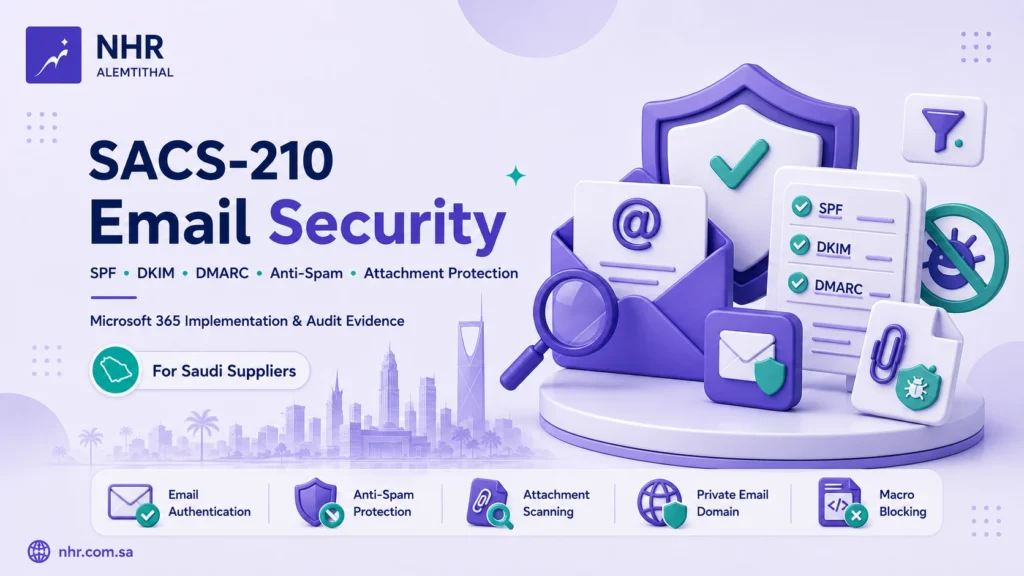
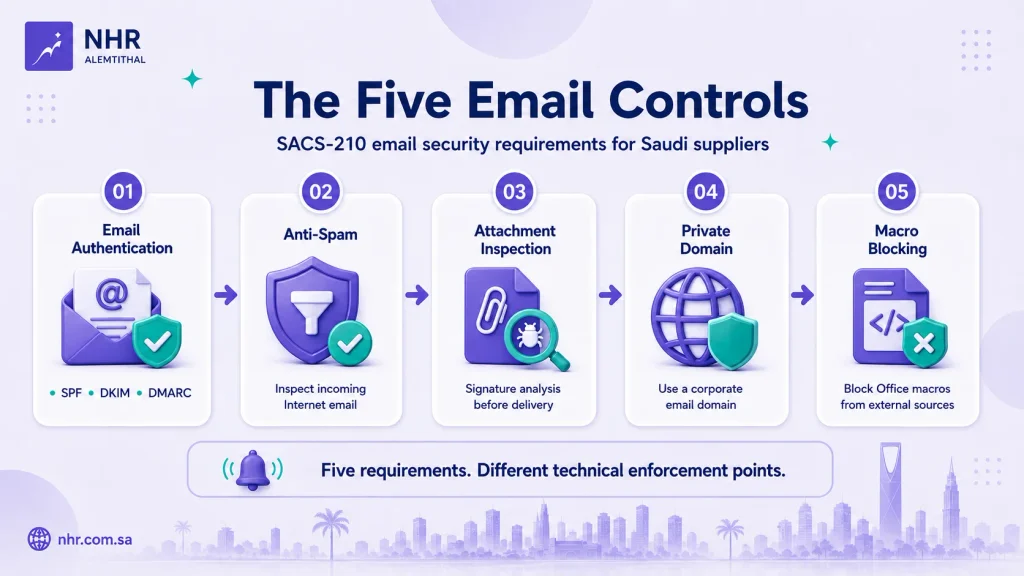
Saudi Aramco’s SACS-210 General Requirements include five controls that directly address email security: TPC1.20 through TPC1.24.
Together, they require third parties to implement email authentication with SPF, DKIM and DMARC, inspect incoming Internet email for spam, scan email attachments before delivery, use a private corporate email domain, and automatically block Microsoft Office macros in files originating from external sources.
Microsoft 365 can support several of these requirements, but the correct mapping is not:
Microsoft license → SACS-210 compliance
It is:
SACS-210 requirement → technical capability → implementation boundary → evidence
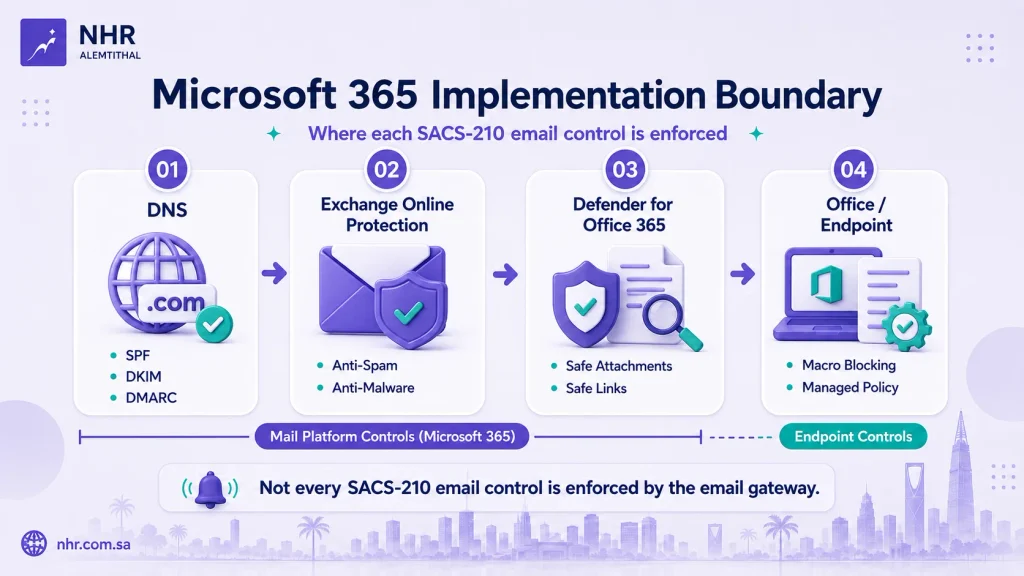
This distinction matters because some controls are implemented in Exchange Online, some depend on public DNS, some can be enhanced with Microsoft Defender for Office 365, and one important control—external macro blocking—is primarily enforced at the Office or endpoint layer rather than by the email gateway.
What Does SACS-210 Require for Email Security?
The five directly related General Requirements are:
| SACS-210 control | Requirement | Primary enforcement point |
|---|---|---|
| TPC1.20 | Implement SPF, DKIM and DMARC | DNS + mail platform |
| TPC1.21 | Inspect incoming Internet email using anti-spam protection | Email gateway / cloud mail service |
| TPC1.22 | Inspect email attachments with signature analysis before allowing them | Anti-malware / email-security service |
| TPC1.23 | Use a private email domain; generic public domains must not be used | Corporate domain + email platform + organizational policy |
| TPC1.24 | Automatically block Microsoft Office macros in files from external sources | Office / endpoint configuration |
The standard is platform-neutral. It does not require Microsoft 365, Exchange Online or Defender for Office 365 specifically.
Microsoft products are therefore implementation options, not the requirements themselves.
TPC1.20: SPF, DKIM and DMARC
TPC1.20 requires the third party to implement Sender Policy Framework (SPF), DomainKeys Identified Mail (DKIM) and DMARC.
Although the SACS-210 wording refers to implementation on the mail server, modern cloud email deployments typically split the implementation between the email platform and public DNS.
For Microsoft 365 custom domains, this usually means:
SPF → DNS
DKIM → Microsoft 365 configuration + DNS CNAME records
DMARC → DNS
All three need to be considered together.
SPF: Identify Authorized Sending Sources
SPF publishes the systems that are authorized to send email for your domain.
In a Microsoft 365 environment, the SPF TXT record is created at the organization’s DNS provider or domain registrar—not through an Exchange Online PowerShell command or Microsoft 365 policy.
The practical task is not simply to copy a default Microsoft SPF value.
You must identify all legitimate sending sources, which might include:
- Microsoft 365.
- CRM systems.
- Marketing platforms.
- Ticketing systems.
- ERP applications.
- Website forms or transactional mail services.
- Other approved third-party senders.
A common implementation problem is creating multiple SPF records for the same domain or omitting a legitimate mail source.
The organization should maintain one coherent SPF policy for each sending domain or subdomain and review it when mail services change.
DKIM: Sign Outbound Email
DKIM applies a cryptographic signature to outbound email so receiving systems can verify that the message was associated with the signing domain and was not altered in transit in a way that invalidates the signature.
For custom domains in Microsoft 365, DKIM configuration involves both:
- Microsoft 365.
- Public DNS.
Each sending domain or relevant subdomain must be assessed separately.
Enabling DKIM for one corporate domain does not prove that every domain used by the organization is protected.
DMARC: Apply Domain Alignment and Policy
DMARC builds on SPF and DKIM and evaluates whether authenticated domains align with the domain visible to the recipient in the From address.
It also allows the domain owner to publish a policy and receive reports that help identify legitimate and unauthorized sending sources.
SACS-210 requires DMARC implementation, but TPC1.20 does not specify a particular policy value such as p=none, p=quarantine or p=reject.
Therefore, avoid claims such as:
“DMARC at quarantine automatically passes the audit.”
A better implementation approach is to:
- Inventory legitimate senders.
- Configure SPF and DKIM correctly.
- Publish DMARC.
- Review authentication and alignment results.
- Progress the policy deliberately according to the organization’s validated mail flows and risk decision.
- Retain evidence of the actual configuration.
If you need a deeper technical explanation of how the three protocols interact, see How SPF, DKIM, and DMARC Work Together.
For a practical setup-oriented resource, see the SMB Email Security Guide – SPF, DKIM, DMARC Setup.
TPC1.21: Anti-Spam Protection for Incoming Internet Email
TPC1.21 requires the third party to inspect all incoming email originating from the Internet using anti-spam protection.
For organizations using Exchange Online, Exchange Online Protection (EOP) provides the baseline anti-spam and anti-malware capabilities used for cloud mailboxes.
This means Microsoft Defender for Office 365 is not automatically required simply to satisfy the wording of TPC1.21.
The implementation question is instead:
Are incoming Internet messages actually passing through an active, correctly scoped anti-spam control?
In a Microsoft 365 environment, review areas such as:
- Inbound anti-spam policies.
- Preset or custom security policies.
- Spam and high-confidence spam actions.
- Phishing-related protections where applicable.
- Quarantine behavior.
- Allowed and blocked senders or domains.
- Connectors or mail-flow routes that could bypass normal inspection.
The important compliance boundary is scope.
A well-configured policy that protects only part of the organization does not prove that all applicable incoming Internet email is inspected.
TPC1.22: Attachment Inspection and Signature Analysis
TPC1.22 requires all email attachments to be inspected using signature analysis before the attachments are allowed.
This wording is important because it distinguishes the baseline requirement from additional advanced protection.
Baseline: Anti-Malware Scanning
Microsoft’s cloud anti-malware protection scans messages and attachments for malware.
Microsoft documents that its heuristic scanning can detect:
- Known malware through signature matching.
- Unknown or suspicious malware through heuristic analysis.
This is directly relevant to the signature-analysis wording in TPC1.22.
For a Microsoft 365 environment, the more defensible mapping is therefore:
TPC1.22 → anti-malware attachment scanning, including signature-based detection
not:
TPC1.22 → Safe Attachments only
Additional Protection: Defender for Office 365 Safe Attachments
Safe Attachments adds another layer of analysis.
After the normal anti-malware inspection, Safe Attachments can open attachments inside a virtual environment and observe their behavior before delivery. This process is commonly described as detonation or sandbox analysis.
That capability can materially improve protection against previously unknown or evasive threats.
But it is an additional layer, not the reason signature analysis exists.
The distinction is:
| Layer | Function |
| Anti-malware protection | Signature-based and heuristic malware inspection |
| Safe Attachments | Additional virtual-environment / detonation analysis |
This matters when preparing your SACS-210 mapping.
Do not claim that sandboxing is the same technical mechanism as signature analysis.
Instead, document the baseline anti-malware control first, and then identify Safe Attachments as an additional protection if it is licensed and enabled.
TPC1.23: Use a Private Corporate Email Domain
TPC1.23 requires a third party to use a private email domain and states that generic public domains such as Gmail and Hotmail must not be used.
This requirement is not specific to Microsoft.
A compliant architecture could use another enterprise email provider, provided the organization is using its own corporate email domain and the other applicable controls are implemented.
In Microsoft 365, the usual implementation is to:
- Add and verify the organization’s corporate domain.
- Configure the appropriate DNS records.
- Use company-managed mailboxes based on that domain.
- Ensure business processes do not rely on personal or generic public email accounts.
For example:
name@company.sais fundamentally different from using a public consumer account for corporate communications.
The evidence should show both the corporate domain and how the organization controls its use.
The current assessment material may also ask for evidence around the prevention of generic public email use. That is an audit-evidence expectation and should not be confused with the exact wording of TPC1.23 itself.
TPC1.24: Block Office Macros from External Sources
TPC1.24 is frequently mis-mapped as an email gateway control.
It is not primarily an Exchange Online or anti-spam setting.
The requirement is that Microsoft Office macros in files originating from external sources, including Internet downloads and email attachments, are automatically blocked.
The relevant technical enforcement happens when the Office file reaches the endpoint.
Microsoft Office uses origin information such as Mark of the Web (MOTW) to identify many files that originated from untrusted Internet locations. Supported Office versions block macros in Internet-origin files by default, subject to the product version, trust decisions, policy and environment.
Organizations that require managed enforcement should evaluate the appropriate supported configuration mechanism for their Office environment, such as:
- Office security policy.
- Group Policy.
- Microsoft Intune where the relevant policy and Office edition support it.
- Endpoint security controls.
- Controlled trusted locations and publishers where business exceptions are necessary.
The important architecture is:
Email delivers the file → endpoint/Office identifies the external origin → Office or endpoint policy controls macro execution
not:
Exchange Online anti-malware policy blocks the macro
This is also why a screenshot of Safe Attachments alone is not sufficient evidence for TPC1.24.
The evidence must relate to the Office or endpoint behavior that actually blocks the macro.
Where Microsoft 365 Fits — and Where It Does Not
The following mapping is a more accurate way to position Microsoft technologies against TPC1.20–TPC1.24:
| SACS-210 | Microsoft capability | Assessment |
| TPC1.20 | Microsoft 365 custom-domain email, DKIM configuration, public DNS for SPF and DMARC | Strong support, but DNS remains part of the implementation |
| TPC1.21 | Exchange Online Protection anti-spam | Strong support when mail flow and scope are correct |
| TPC1.22 | Microsoft 365 anti-malware protection | Strong baseline support for signature/heuristic malware scanning |
| TPC1.22 enhancement | Defender for Office 365 Safe Attachments | Additional protection; not the baseline signature-analysis mechanism |
| TPC1.23 | Exchange Online with a custom corporate domain | Strong implementation option, but the requirement is platform-neutral |
| TPC1.24 | Office macro protection and applicable endpoint/management policy | Outside the email gateway itself |
The practical lesson is that Microsoft 365 email security is an architecture, not one switch.
You may need to configure controls across:
DNS → Exchange Online → Defender → Office → Endpoint Management
Do You Need Microsoft Defender for Office 365?
Not for every SACS-210 email-security requirement.
This distinction should be clear when designing a small or medium-sized organization’s Microsoft environment.
Exchange Online Protection
EOP provides the foundational email-protection layer for cloud mailboxes, including capabilities such as:
- Anti-spam.
- Anti-malware.
- Malware attachment scanning.
- Quarantine and message actions.
- Email-security filtering.
These capabilities are directly relevant to TPC1.21 and the baseline attachment-scanning requirement in TPC1.22.
Defender for Office 365
Defender for Office 365 extends that baseline with capabilities including:
- Safe Attachments.
- Safe Links.
- Additional anti-phishing protections.
- More advanced threat investigation capabilities depending on plan.
Safe Attachments is particularly useful because it adds behavioral detonation after normal malware scanning.
That can strengthen the organization’s security posture, but avoid saying:
“Defender for Office 365 is mandatory for TPC1.21 and TPC1.22.”
The SACS-210 controls define security outcomes and mechanisms; they do not mandate the Microsoft Defender product.
Where Microsoft 365 Business Premium Fits
For many Saudi SMEs already standardizing on Microsoft 365, Microsoft 365 Business Premium can provide a useful combination of identity, endpoint and email-security capabilities.
Business Premium currently includes capabilities such as:
- Exchange business email.
- Microsoft Entra ID P1.
- Microsoft Intune Plan 1.
- Microsoft Defender for Business.
- Microsoft Defender for Office 365 Plan 1.
Defender for Office 365 Plan 1 includes features such as Safe Attachments and Safe Links.
If Business Premium fits the organization’s wider technical requirements, it can be reviewed through the NHR Alemtithal Microsoft 365 Business Premium offering.
But the same rule applies here as with identity security:
Licensing enables capabilities. Licensing does not establish SACS-210 compliance.
The controls still need to be configured, scoped, operated and evidenced.
Do not assume that purchasing Business Premium automatically implements the required DNS records, mail policies or endpoint macro controls.
What Evidence Should You Prepare?
SACS-210 implementation is not proven by a product name or license invoice.
The evidence should demonstrate what is actually configured and operating.
A practical evidence model is:
| Control | Policy / process | Configuration evidence | Operational evidence |
| TPC1.20 | Email-authentication responsibility and change process | SPF, DKIM and DMARC DNS/configuration | Validation results and current records |
| TPC1.21 | Email-security / anti-spam requirement | Active inbound anti-spam policy and scope | Quarantine, detections or relevant message records |
| TPC1.22 | Attachment-scanning requirement | Anti-malware / attachment scanning configuration | Logs or reports showing malicious attachments blocked or quarantined |
| TPC1.23 | Corporate email-use rule | Corporate domain ownership and mail configuration | Evidence showing corporate mailboxes and controlled use |
| TPC1.24 | External macro-blocking requirement | GPO, Office, Intune or endpoint policy as applicable | Sample endpoint verification and relevant security events |
The current compliance-report template gives useful examples of the type of evidence assessors may request.
For TPC1.20, it includes DNS records or screenshots for SPF, DKIM and DMARC, mail-security configuration and validation output.
For TPC1.22, it lists a documented email-security procedure, signature-based scanning configuration, screenshots and sample logs showing malicious attachments being blocked or quarantined.
For TPC1.24, the evidence examples move clearly to the endpoint layer: documented policy, Group Policy or endpoint-security configuration, sample endpoint screenshots and monitoring or alerts.
This reinforces a key rule:
Policy ≠ configuration ≠ operational evidence
A screenshot can demonstrate a setting, but the complete evidence package should make clear:
- What control is being demonstrated.
- Which company/domain/tenant/device the evidence belongs to.
- What scope is covered.
- Whether the configuration is active.
- Whether the evidence is current.
- Whether operational results can be demonstrated where applicable.
For a broader preparation model, see Aramco CCC Audit Readiness: A Practical SACS-210 Checklist.
For implementation across the wider General Requirements, use the SACS-210 Technical Implementation Checklist.
Common SACS-210 Email-Security Mapping Mistakes
Avoid these seven claims.
- “We published SPF, so TPC1.20 is complete.”
TPC1.20 requires SPF, DKIM and DMARC. - “Defender for Office 365 is required for every SACS-210 email control.”
It is not. EOP provides baseline anti-spam and anti-malware capabilities, while other controls sit in DNS or at the endpoint. - “Safe Attachments is the signature analysis required by TPC1.22.”
Safe Attachments is an additional detonation layer. Microsoft’s baseline anti-malware protection provides signature-based malware detection. - “Macro blocking is configured in the Exchange anti-malware policy.”
TPC1.24 is primarily an Office/endpoint enforcement requirement. - “DMARC
p=quarantinemeans the control automatically passes.”
SACS-210 requires DMARC implementation but does not prescribe that specific policy value. - “A screenshot proves the email-security control.”
Screenshots are useful evidence, but scope, policy, configuration and operational records may also need to be demonstrated. - “We bought Microsoft 365 Business Premium, so the email controls are implemented.”
A license provides capabilities. The organization still has to configure and operate them.
Email MFA Is a Separate Access-Control Requirement
Email security does not end with TPC1.20–TPC1.24.
SACS-210 TPC1.12 separately requires MFA for several access scenarios, including access to company email through web or mobile devices.
That is an identity and access-control requirement, so it should not be mixed into the email gateway mapping above.
For the Microsoft identity implementation, see Microsoft Entra ID for SACS-210: A Guide for Saudi SMEs.
That guide covers the relationship between MFA, Conditional Access, SSO, licensing boundaries and access evidence.
Implementing Email Security for SACS-210
A practical implementation sequence is:
- Identify every corporate email domain and sending source.
- Configure and validate SPF, DKIM and DMARC.
- Confirm all incoming Internet email passes through active anti-spam protection.
- Verify attachment scanning and signature-based anti-malware protection.
- Decide whether additional Defender for Office 365 protections such as Safe Attachments are appropriate.
- Confirm users conduct corporate business through approved private-domain email accounts.
- Verify external-source Office macros are blocked at the endpoint or Office layer.
- Collect evidence that connects each requirement to its actual configuration and operating records.
If you need a compact implementation aid for your IT team, use the SACS-210 Technical Implementation Checklist.
Organizations that need hands-on remediation across Microsoft 365, endpoints, documentation and the wider SACS-210 environment can review the Aramco Cybersecurity Compliance Certificate implementation service.
NHR Alemtithal provides implementation, cybersecurity support, documentation and readiness services. Formal independent assessment and CCC certification remain the responsibility of an authorized audit firm under the applicable process.
Conclusion
SACS-210 email security cannot be reduced to “enable Defender” or “publish SPF.”
The five directly related controls cover different layers:
TPC1.20 → email authentication
TPC1.21 → incoming anti-spam
TPC1.22 → attachment inspection
TPC1.23 → private corporate email domain
TPC1.24 → external Office macro blocking
For Microsoft 365 environments, the corresponding architecture can span:
Public DNS → Exchange Online Protection → Defender for Office 365 → Office / Endpoint controls
The right question is therefore not:
“Does Microsoft 365 make our email SACS-210 compliant?”
It is:
“Which SACS-210 requirement are we implementing, which technical layer enforces it, what are the limitations, and what evidence proves it is operating?”
That approach produces a more accurate implementation plan—and a much stronger evidence package.
Official Microsoft References
- Set up SPF to identify valid email sources for your Microsoft 365 domain
- How to use DKIM for email in your custom domain
- Set up DMARC to validate email in Microsoft 365
- Anti-malware protection FAQ
- Safe Attachments in Microsoft Defender for Office 365
- Recommendations for Microsoft 365 security settings
- Macros from the Internet are blocked by default in Office
- Microsoft 365 for business security overview
Need help with Aramco CCC Certification?
Get a Free Expert Consultation.