Executive Summary (TL;DR)
In short: Choosing the right Microsoft 365 subscription can save your business up to 30% on annual costs while maintaining productivity and security in a Hybrid Work environment.
- Business Basic (SAR 268/year): For field teams working via browser and mobile
- Business Standard (SAR 536/year): For office employees needing desktop applications
- Business Premium (SAR 842/year): For departments handling sensitive data requiring advanced Zero Trust protection
💡 Pro tip: Not all employees need the same subscription. You can mix plans based on each employee’s role.
🔒 Every subscription includes our FREE Essential Security Foundation — 9 enterprise-grade security configurations deployed within 24–48 hours.
Introduction: The Real Challenge for Small Businesses in Saudi Arabia
If you run a small or medium-sized business in Saudi Arabia, you’re likely facing these challenges:
- Your team needs professional productivity tools (Word, Excel, Outlook)
- You need professional email with your business domain
- You want easy collaboration via Microsoft Teams
- You need to protect your data from increasing cyber threats
- Your budget is limited and you want the best value for money
- You want to adopt AI tools like Microsoft 365 Copilot in your workflow
The solution? Microsoft 365 – Microsoft’s leading cloud productivity platform. (Learn more about Microsoft 365 for Business)
But the real question is: Which of the three plans (Basic, Standard, Premium) actually fits your business?
In this comprehensive guide, we’ll help you make the right decision based on your team’s actual needs and explain how NHR Alemtithal – as a certified Microsoft CSP partner based in Dammam, Saudi Arabia – provides you with the right subscription plus a free Essential Security Foundation that builds a solid, secure starting point for your cloud work environment and boosts your Microsoft Secure Score.
Quick Overview: Comparing the Three Plans
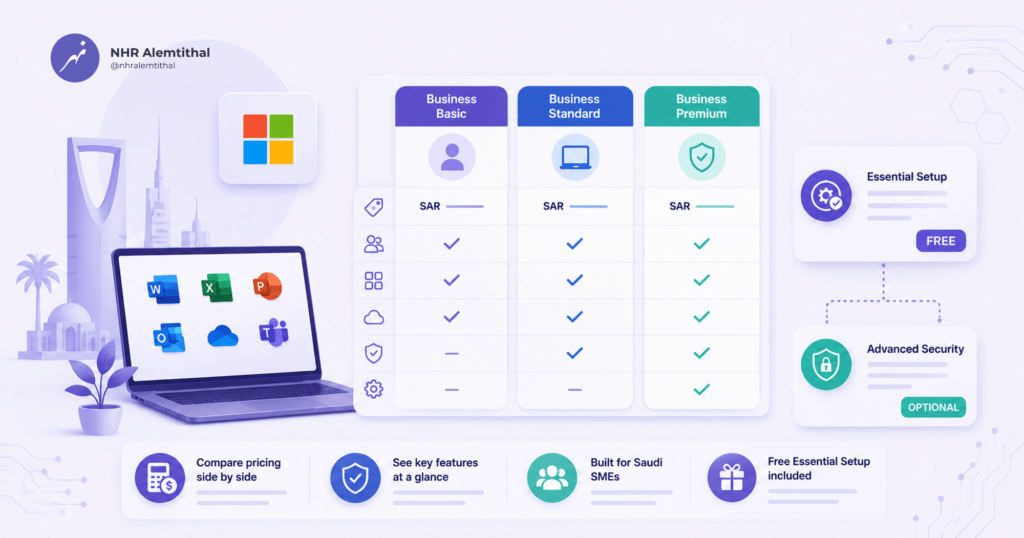
Before diving into details, here’s a quick comparison table (All Prices are VAT Exclusive):
| Feature | Business Basic | Business Standard | Business Premium |
| Annual Price | SAR 268/user | SAR 536/user | SAR 842/user |
| Office Apps | Web & mobile only | Web + mobile + desktop | Web + mobile + desktop |
| Exchange Online (100 GB) | Exchange Online (100 GB) | Exchange Online (100 GB) | |
| Cloud Storage | 1 TB OneDrive | 1 TB OneDrive | 1 TB OneDrive |
| Microsoft Teams | Included | Included | Included |
| Advanced Protection | Not Included | Not Included | Microsoft Defender for Business |
| Device Management | Not Included | Not Included | Microsoft Intune |
| Identity Management | Microsoft Entra ID Free | Microsoft Entra ID Free | Microsoft Entra ID P1 |
| Microsoft 365 Copilot | Available as Add-on | Available as Add-on | Available as Add-on |
| Best For | Field teams | Office employees | Sensitive departments |
Microsoft 365 Business Basic: The Cost-Effective Solution for Field Teams
Who is this plan for?
Microsoft 365 Business Basic is ideal if your team:
- Works primarily outside the office (sales representatives, field technicians)
- Uses smartphones and tablets more than computers
- Needs professional email and basic Office applications
- Doesn’t need full desktop applications
What do you get?
- Office apps via web and mobile: Word, Excel, PowerPoint, Outlook (no desktop version)
- Professional email: name@yourbusinessdomain.com with 100 GB mailbox (Exchange Online service limits)
- Cloud storage: 1 TB OneDrive per user
- Microsoft Teams: For chat and video meetings
- Additional apps: Planner, Forms, Bookings
- Cloud Identity: Basic identity management via Microsoft Entra ID
Real-world example from the Saudi market:
A small construction company in Riyadh has 15 field engineers. Instead of buying Microsoft 365 Business Standard subscription for every employee (SAR 536), they chose Microsoft 365 Business Basic (SAR 268) because engineers work on-site and use their phones and tablets.
Result: The company saved SAR 4,020 annually while maintaining the same productivity level.
Microsoft 365 Business Standard: The Balanced Choice for Office Employees
Who is this plan for?
Microsoft 365 Business Standard is the most popular choice for small businesses because it provides:
- Full Office applications (desktop + web + mobile)
- Professional email with 100 GB mailbox
- Advanced collaboration tools
- Reasonable price
Ideal if your team:
- Works primarily from the office
- Needs full Office applications (especially advanced Excel)
- Uses Outlook extensively
- Needs advanced features in PowerPoint and Word
What do you get?
All Microsoft 365 Business Basic features +
- Full desktop Office applications: Word, Excel, PowerPoint, Outlook, OneNote, Access (PC only), Publisher (PC only)
- App activation: Install apps on all your devices and activate them simultaneously on up to 5 devices per user
- Full Outlook: With advanced calendar features and task management
- Advanced Excel: Power Query, Power Pivot, advanced data analysis features
- Advanced PowerPoint: Designer, professional presentation features
- Additional apps: Loop, Clipchamp, Forms, Bookings, Planner
Real-world example:
A financial consulting firm in Jeddah has 10 consultants. Consultants need advanced Excel for financial data analysis and PowerPoint for client presentations.
Solution: Microsoft 365 Business Standard (SAR 536/user) provides everything they need at a reasonable price.
Microsoft 365 Business Premium: Advanced Protection for Sensitive Departments
Who is this plan for?
Microsoft 365 Business Premium is essential if your business:
- Handles sensitive data (financial, HR, intellectual property)
- Needs advanced protection from cyber threats following Zero Trust Security principles
- Wants to manage employee devices remotely
- Is subject to strict compliance requirements, for example Aramco Third-Party Cybersecurity Compliance Certificate (CCC) or NCA ECC 2-2024
- Has a small IT team or no IT team
What do you get?
All Microsoft 365 Business Standard features +
Microsoft Defender for Business: Advanced cyber threat protection including:
- Next-generation antivirus (NGAV)
- Endpoint Detection and Response (EDR)
- Protection against phishing and malware
- Automated threat remediation
Microsoft Intune: Remote device management including:
- Manage Windows, macOS, iOS, Android devices
- Apply security policies
- Remote wipe for lost devices
- Separate work and personal data (MAM)
Microsoft Entra ID P1: Advanced identity management including:
- Conditional Access (control access based on location, device, risk)
- Advanced Multi-Factor Authentication (MFA)
- Self-Service Password Reset
- Risk-based Identity Protection
- Dynamic group management
- Role-based access control (RBAC)
- Identity protection
- Single sign-on (SSO)
Microsoft Purview: Data protection including:
- Data Loss Prevention (DLP)
- Sensitivity Labels
- Sensitive data encryption
Real-world example:
An accounting firm in Dammam has 5 accountants and 3 HR employees. These employees handle sensitive financial data and personal employee information.
Solution: Microsoft 365 Business Premium (SAR 842/user) protects sensitive data and provides remote device management, significantly reducing risks of breaches and data leaks while boosting your Microsoft Secure Score.
⚠️ Important: Business Premium gives you the tools. Configuring them correctly requires expertise. That’s why every subscription purchased through NHR includes our free Essential Security Foundation — our engineers apply the essential baseline protections available on your plan within 24–48 hours, so you start secure from day one.
Microsoft 365 Copilot: AI Power in Your Workspace
What is Microsoft 365 Copilot?
Microsoft 365 Copilot is an AI assistant embedded within Microsoft 365 apps that uses large language models (LLMs) combined with your organization’s data in Microsoft Graph to provide intelligent and secure assistance.
How does it work with Microsoft 365 Business plans?
Available as Add-on: You can add Microsoft 365 Copilot to Standard and Premium plans for an additional per-user fee. (Note: it is not currently available as an add-on for Business Basic, Business Standard and Business Premium.)
Practical use cases:
- Automatically summarize Teams meetings and extract action items
- Analyze data in Excel and suggest appropriate formulas
- Create professional content in Word
- Design presentations in PowerPoint
- Intelligent search in Outlook email
When do you need Microsoft 365 Copilot?
- Sales teams that need to quickly analyze customer interactions
- Marketing and creative departments
- Project managers dealing with large amounts of data
- Technical support teams
💡 Pro tip: As a small business, start by deploying Microsoft 365 Copilot to 3–5 key users (managers, creative teams) to measure impact before expanding, then scale usage gradually as needed.
🔒 AI Security Note: If you deploy Copilot, we recommend Business Premium so you can protect AI interactions with Conditional Access, Intune app protection, and Purview audit logging — the advanced controls included in that plan.
Smart Mixing Strategy: Save Up to 30% on Costs
Why buy the same expensive subscription for everyone?
Many small businesses make the mistake of buying the same subscription (often Microsoft 365 Premium) for all employees. This wastes money!
Solution: Mix plans based on each employee’s role
Practical example for a business with 20 employees:
| Department | Employees | Suitable Plan | Price/User | Annual Total |
| Senior Management | 3 | Premium | SAR 842 | SAR 2,526 |
| Accounting & Finance | 4 | Premium | SAR 842 | SAR 3,368 |
| Human Resources | 2 | Premium | SAR 842 | SAR 1,684 |
| Field Sales Team | 6 | Basic | SAR 268 | SAR 1,608 |
| Office Staff | 5 | Standard | SAR 536 | SAR 2,680 |
| Total | 20 | SAR 11,866 |
What if you bought Premium for everyone?
20 employees × SAR 842 = SAR 16,840
Savings:
SAR 16,840 − SAR 11,866 = SAR 4,974 annually (29.5% savings)
💡 Smart Reinvestment Tip: Reinvest part of these savings back into your business — upgrade key users to Business Premium, add Microsoft 365 Copilot for power users, or add standalone Defender for Business for the whole team. All are available in our store.
Your Security Setup: The Essential Security Foundation (Included FREE)
Buying the Business Plan subscription is the beginning of the journey, not the end. At NHR Alemtithal, we believe in standardized, repeatable security – not vague promises. Here’s exactly what you get with every business plan subscription purchased through our store, completed within 24–48 business hours:
| Foundation | What We Do |
| 1. MFA Enforcement | Enforce Multi-Factor Authentication for all users via Security Defaults |
| 2. Verify Domain Records | Verify ownership, link domain, configure SPF/DKIM/DMARC |
| 3. Legacy Auth Blocked | Disable POP3, IMAP, SMTP legacy protocols at the Exchange level |
| 4. External Sender Banner | Add an external sender warning banner to incoming messages |
| 5. Sharing Policies | Restrict default external file sharing (OneDrive/SharePoint/Teams) |
| 6. Basic MDM Policies | Enable basic mobile device management for remote wipe of lost devices |
| 7. Anti-Spam & Anti-Phishing | Configure built-in Exchange Online Protection settings |
| 8. Dedicated Admin Accounts | Create dedicated, cloud-only admin accounts without active mailboxes |
| 9. Unified Audit Log | Enable audit logging across Microsoft 365 for security monitoring |
| 🎁 Handover Guide | Simple 2-page document explaining your setup |
This foundation significantly raises your Microsoft Secure Score and closes the most common attack vectors — at no extra cost.
See the full Essential Security Foundation page →
⚠️ Important Note: We apply Microsoft’s Recommended Security Baselines available on your plan. No solution provides 100% protection. Our goal is to move you from “high exposure” to “best-practice protected.” Security introduces some friction (e.g., MFA prompts). We provide a user cheat sheet, but internal change management is your responsibility.
Frequently Asked Questions (FAQ)
Q1: What’s the difference between Microsoft 365 Business Basic and Microsoft 365 Business Standard?
A: Microsoft 365 Business Basic provides Office apps via web and mobile only, while Microsoft 365 Business Standard adds full desktop applications that can be activated on up to 5 devices simultaneously per user.
Q2: Can I upgrade my plan later?
A: Yes, you can upgrade from Microsoft 365 Business Basic to Microsoft 365 Business Standard or Microsoft 365 Business Premium at any time. As a CSP partner, we can manage this upgrade seamlessly without service interruption.
Q3: What is the maximum number of users in Microsoft 365 Business plans?
A: Each plan supports up to 300 users. You can have 300 Basic, 300 Standard, and 300 Premium users in the same tenant. If you exceed 300 per plan, you’ll need Enterprise plans (E3 or E5). (Official details)
Q4: Can I use Microsoft 365 Business Basic on my personal phone?
A: Yes, you can activate mobile Office apps on up to 5 devices per user. Business Basic doesn’t include Intune, but your tenant is still covered by our free Essential Security Foundation (MFA, domain linking, legacy auth blocking, and more).
Q5: Are there plans without Microsoft Teams?
A: Yes, Microsoft offers (no Teams) editions of Business Basic, Business Standard, and Business Premium at lower prices, ideal for organizations that don’t use Teams. Check out our store for these options.
Q6: Can I add Microsoft 365 Copilot to my existing plan?
A: Yes, Microsoft 365 Copilot is available as an add-on for Standard and Premium plans. We can activate it for users who actually need AI power in their daily work.
Q7: Are prices inclusive of VAT?
A: All displayed prices here exclude VAT (15%). VAT will be added at checkout.
Q8: Is the Essential Security Foundation really free? What’s the catch?
A: No catch. We include it because an unconfigured tenant is a liability for both you and us. It takes our team ~2 hours using standardized checklists, and it ensures every customer starts on a secure foundation when purchasing subscriptions through our store.
Q9: What if I bought subscriptions elsewhere? Can I still get the setup?
A: The free Essential Security Foundation is an exclusive value-add for subscriptions purchased through NHR Alemtithal. If you have existing subscriptions with another provider and need security hardening, we offer separate security audits and hourly consulting services — contact us for a custom quote.
Q10: I already have a Microsoft 365 environment. What should I do?
A: We recommend reviewing your current configuration against our Essential Security Foundation checklist (9 foundations). If your subscriptions are with another provider, contact us for a custom security assessment. If you’re starting fresh or moving to us, purchase through our store and the foundation is included free.
Conclusion: Start Your Cloud Work Environment Today
Choosing the right Microsoft 365 subscription isn’t just a technical decision; it’s a strategic decision that affects your team’s productivity, your data’s security, and your business costs.
Remember:
- Don’t buy the same subscription for everyone
- Every business plan subscription includes our FREE Essential Security Foundation (9 configurations)
- Choose the right plan for each job role
- Leverage AI through Microsoft 365 Copilot when needed
Ready to start?
🛒 Browse plans and order now: nhrsastore.com